
To restore a SQL Server database to point of failure, the database's recovery model should not be "Simple", because it needs a transaction log backup to do that, "Simple" recovery model does not have a transaction log.
If your database's recovery modal is "Simple", you can not restore to the point of failure, in this case, please select the latest differential and full backup do the restore. If your database's recovery modal is not "Simple", to restore the database to the point of failure :
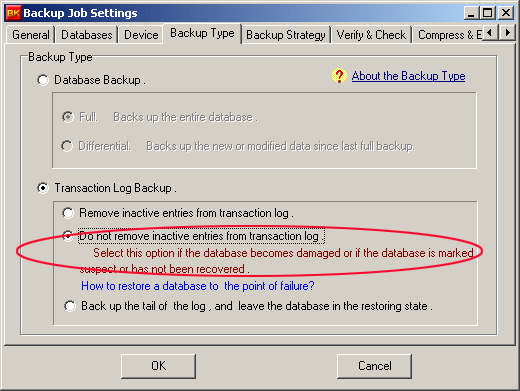
1). Back up the tail of the transaction log after SQL Server fails.
To get this type of transaction log backup, please select the backup type "Do not remove inactive entries from the transaction log.", see the following instruction. If this step fails, it indicates that the storage log file may have problems, it can not be read, in this case, the database can not be restored to the point of failure.
2). Remove the error the cause of the database fails.
3). Create a new restoration job and select this transaction log backup to restore the database.