
Just open Backup Agent Manger and please follow steps below to register the SQL Server Backup Agent :
1 .Please make sure your current program is the latest version according to the build number, if not , please download a latest version from here .
2 .Click the "Help->Enter Registration Code" menu in SQL Server Backup Manager main window to bring up the registration form.
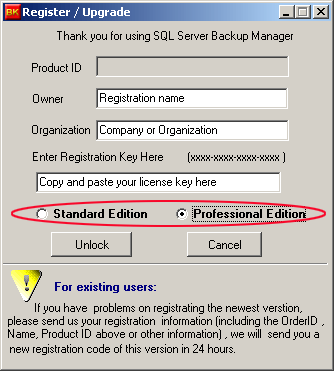
3 .Copy the key above in the "Registration Key" field .
4 .Select a proper edition for the registration code . If the registration is upgrade from standard edition , the only selection is professional edtion.
5 .Click "Unlock" button and then restart the Backup Manager to complete the registration.